Unlock Insights for your Store: Mastering Jumpseller Dashboard Metrics
Dive deep into customer behavior with Jumpseller dashboard. Learn how to analyze key metrics, optimize your strategy, and boost your online store p...
Tampermonkey is a third-party browser extension that runs userscripts: small pieces of code that can change how a website looks or behaves in your browser. A reviewed script could highlight useful information or add a visual summary to your Jumpseller admin.
You do not need to write code to use the complete example below. You do need to understand its purpose, permissions and scope. This guide explains the setup in Chrome, using a visual order-unit counter as an example.
A visual customization changes what you see in that browser profile. It is not a native Jumpseller feature and does not automatically appear for your colleagues or on another computer.
The example counter only reads the product quantities already displayed on an order and adds a banner. It does not save the total in the order, change the storefront, or add the total to emails and exports. Other userscripts can behave very differently: do not assume that every Tampermonkey script is read-only.
.jumpseller.com, and review the script’s scope before installing it.Tampermonkey is not made by Jumpseller. A change to the admin may stop a customization from working; compatibility with every store, browser or future admin version is not guaranteed.
If you see Remove from Chrome, it is already installed. Do not install another copy. If your organisation blocks installation, ask your administrator for help instead of bypassing the restriction.
chrome://extensions/ in Chrome’s address bar and press Enter.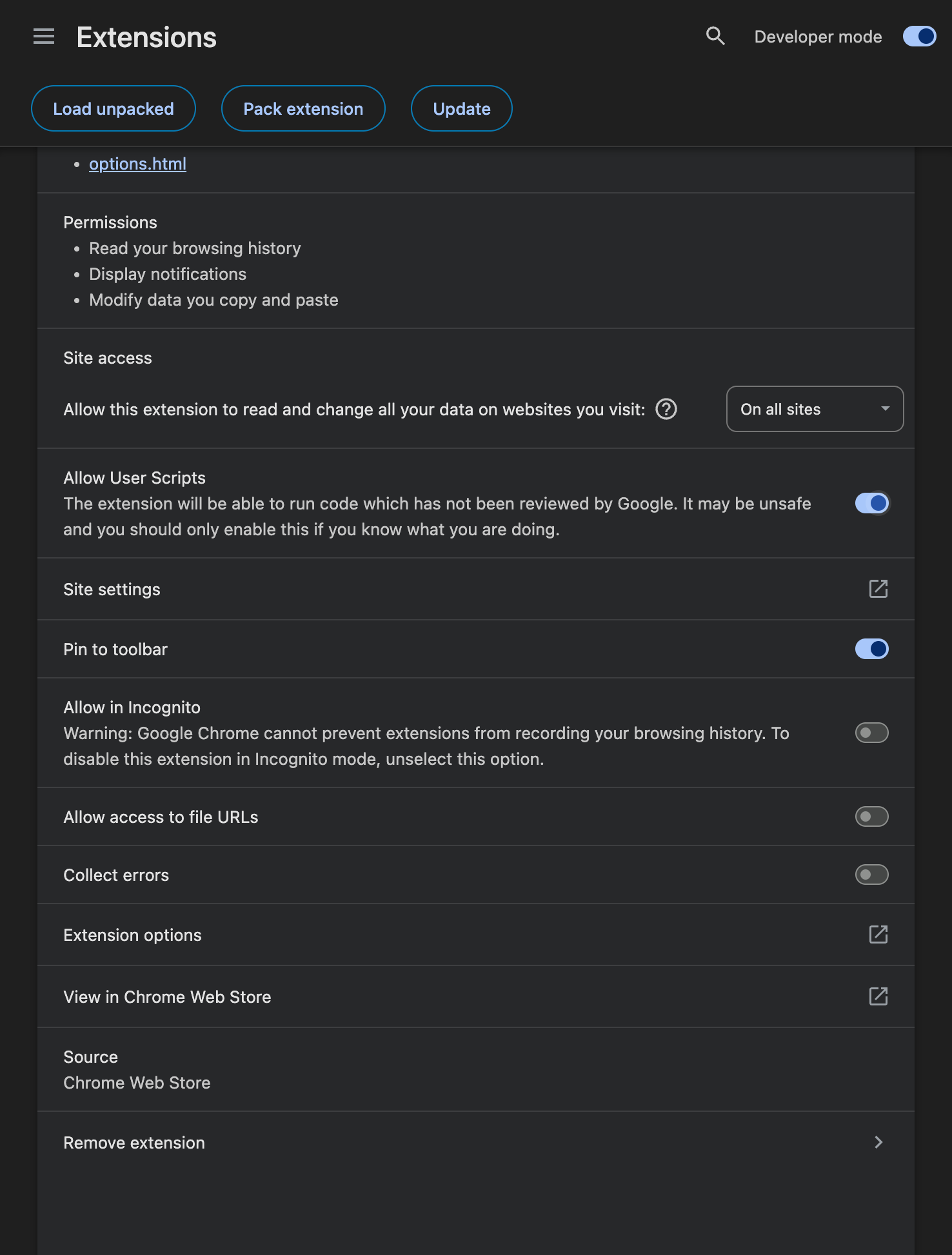
The screenshot shows the actual settings used for this example, not a recreated installation dialog. Labels and requirements can vary by Chrome version; see Tampermonkey’s official help if your screen differs. This example does not require incognito access, file URL access or additional download permissions.
The complete script is below. You do not need to change your domain or edit the code. It runs only on orders-v2 admin order routes at store addresses ending in .jumpseller.com. It does not run on the public storefront or other websites. An admin served from a custom domain or a different order interface is outside this example’s scope.
The script’s scope covers Jumpseller store admin order routes, not every website. Review that scope when installing it. This code only adds a local indicator; it does not send or save data. It was tested in alejandrotest and with route and language fixtures; it has not been tested in every store. If the admin changes or the counter does not appear, disable it and contact support.
// ==UserScript==
// @name         Jumpseller — Order units (visual)
// @namespace    jumpseller.local.order-units
// @version      0.2.0
// @description  Suma las cantidades ya renderizadas del pedido. Solo visual; no guarda ni envía datos.
// @match        https://*.jumpseller.com/admin/*/orders-v2/*
// @match        https://*.jumpseller.com/admin/orders-v2/*
// @run-at       document-idle
// @grant        none
// @noframes
// ==/UserScript==
/* Local visual helper for Jumpseller orders-v2 admin pages only.
 * No network calls, credentials, storage or order/theme writes.
 * Tested in alejandrotest and representative DOM fixtures, not every store.
 * Bundles/packs are unsupported: parent/component rows can be double-counted.
 * If the admin markup changes, disable the script and request a review.
 */
(() => {
  'use strict';
  if (!/^([a-z0-9]+(?:-[a-z0-9]+)*)\.jumpseller\.com$/i.test(location.hostname) || window.top !== window.self) return;
  if (location.protocol !== 'https:' || !/^\/admin\/(?:[a-z]{2}(?:-[a-z]{2})?\/)?orders-v2(?:\/|$)/i.test(location.pathname)) return;
  const KEY = '__jumpsellerVisualOrderUnits';
  const ID = 'jumpseller-visual-order-units';
  window[KEY]?.stop?.();
  let scheduled = null;
  let stopped = false;
  const routeId = () => location.pathname.match(/^\/admin\/(?:[a-z]{2}(?:-[a-z]{2})?\/)?orders-v2\/edit\/(\d+)\/?$/i)?.[1] || null;
  const locale = location.pathname.match(/^\/admin\/([a-z]{2})(?:-[a-z]{2})?\/orders-v2/i)?.[1] || 'en';
  const labels = locale === 'pt' ? ['Total de unidades', 'linhas de produto', 'Cálculo local; não é guardado. Bundles não suportados.'] : locale === 'es' ? ['Total de unidades', 'líneas de producto', 'Cálculo local; no se guarda. Bundles no soportados.'] : ['Total units', 'product lines', 'Local calculation; not saved. Bundles unsupported.'];
  function remove() { document.getElementById(ID)?.remove(); }
  function directText(element) {
    return Array.from(element.childNodes).filter(n => n.nodeType === 3).map(n => n.textContent).join('');
  }
  function readTable(table) {
    let units = 0, lines = 0;
    for (const row of table.querySelectorAll('tbody > tr')) {
      // Source TableDesktop renders one price/qty div in each product row;
      // expanded discount/tax/profit rows have colspan and no such price div.
      const price = row.querySelector('td > div.tabular-nums');
      const productImage = row.querySelector('td img[width="56"]');
      if (!price && !productImage) continue;
      if (!price || !productImage) throw Error('Unrecognized product row');
      const match = directText(price).trim().match(/\s[x×]\s*(\d+)\s*$/u);
      if (!match) throw Error('Unrecognized quantity');
      const qty = Number(match[1]);
      if (!Number.isSafeInteger(qty) || qty < 0 || !Number.isSafeInteger(units + qty)) throw Error('Invalid quantity');
      units += qty; lines++;
    }
    if (!lines) throw Error('No product rows');
    return { units, lines };
  }
  function update() {
    scheduled = null;
    if (stopped) return;
    const id = routeId();
    if (!id) { remove(); return; }
    // Tie URL to the order header actually rendered by Edit.jsx. On SPA
    // navigation the old table must not be labelled as the newly requested order.
    const headings = Array.from(document.querySelectorAll('.text-xl.font-normal'))
      .filter(e => new RegExp('#\\s*' + id + '\\s*$').test(e.textContent.trim()));
    if (headings.length !== 1) { remove(); return; }
    const heading = headings[0];
    const root = heading.parentElement;
    const tables = Array.from(root.querySelectorAll('table.w-full.border-collapse'))
      .filter(t => t.querySelector('td img[width="56"]'));
    if (tables.length !== 1) { remove(); return; }
    let count;
    try { count = readTable(tables[0]); }
    catch (_) { remove(); return; } // Fail closed: no misleading partial count.
    let badge = document.getElementById(ID);
    if (!badge) {
      badge = document.createElement('div');
      badge.id = ID;
      badge.setAttribute('role', 'status');
      badge.setAttribute('aria-live', 'polite');
      badge.style.cssText = 'margin:8px 0;padding:10px 14px;border:1px solid #d1d5db;border-radius:6px;background:#f8fafc;color:#111827;font-size:15px;font-weight:600';
      heading.insertAdjacentElement('afterend', badge);
    } else if (badge.previousElementSibling !== heading) {
      heading.insertAdjacentElement('afterend', badge);
    }
    const label = `${labels[0]}: ${count.units}`;
    if (badge.textContent !== label) badge.textContent = label;
    const title = `#${id} · ${count.lines} ${labels[1]} · ${labels[2]}`;
    if (badge.title !== title) badge.title = title;
  }
  function schedule() {
    if (!stopped && scheduled === null) scheduled = setTimeout(update, 80);
  }
  const observer = new MutationObserver(schedule);
  observer.observe(document.body, { childList: true, subtree: true, characterData: true });
  const interval = setInterval(schedule, 1000); // URL changes with no DOM event.
  const handle = {
    stop() {
      stopped = true;
      observer.disconnect();
      clearTimeout(scheduled);
      clearInterval(interval);
      remove();
      if (window[KEY] === handle) delete window[KEY];
    }
  };
  window[KEY] = handle;
  update();
})();
You can also download the same script. The code block and download use one maintained source; neither needs editing.
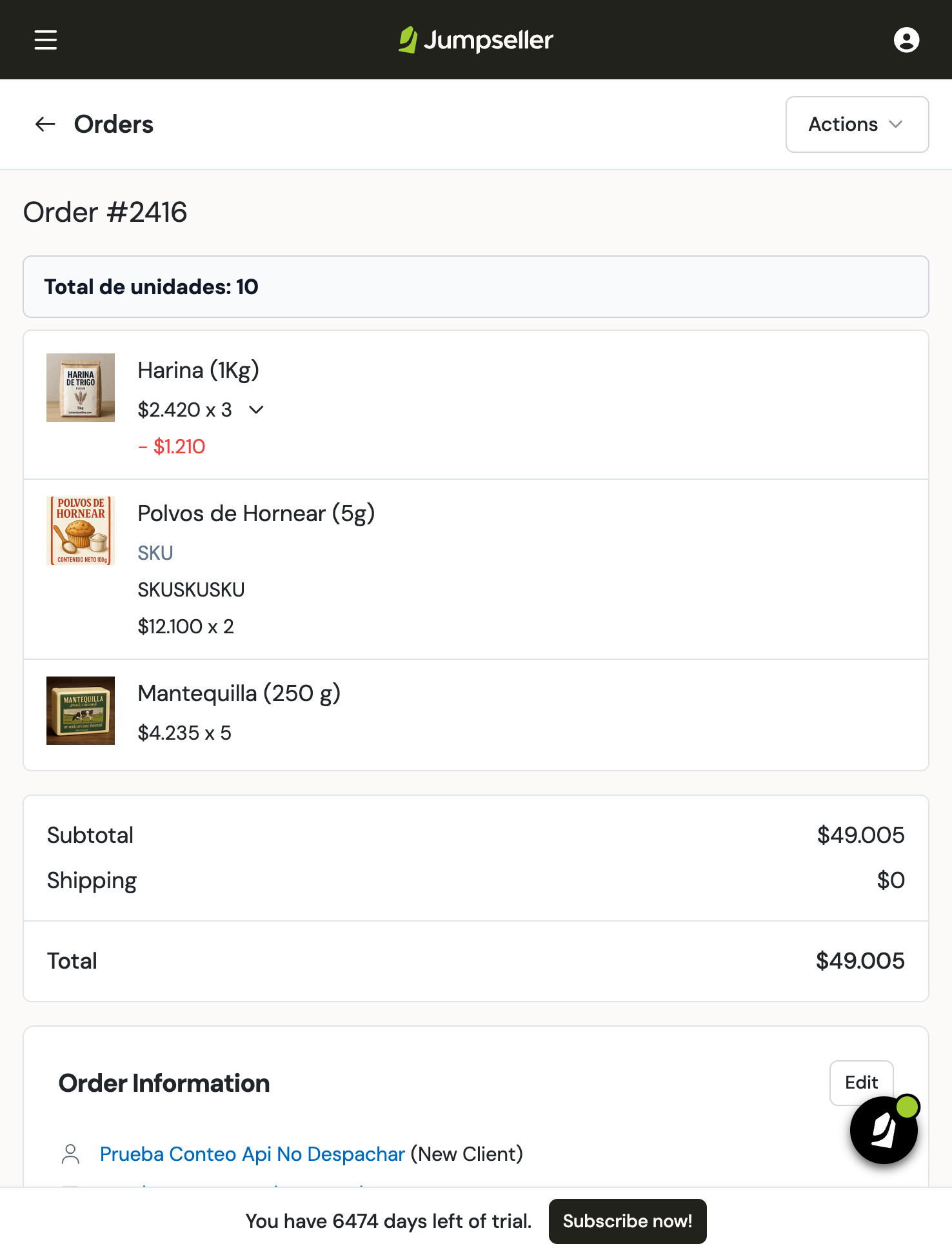
Imagine you sell baking ingredients. An order has three lines: 3 bags of flour, 2 packs of baking powder and 5 packs of butter. That is 10 units, not three units.
The screenshot below is from the real alejandrotest admin, using fictional test-store data. Order 2416 contains three physical product lines with no bundle relationships. The screenshot shows the Spanish label Total de unidades: 10. The current script uses the admin language: Total units in English and Total de unidades in Spanish or Portuguese.
To check a reviewed counter in your own store:
Bundles are not supported by this example. It sums displayed rows, so it may count a bundle’s parent row and component rows together. Do not use it to determine how many physical items to pack for a bundle order. Your team must agree and implement that counting rule separately. See Product bundles.
The example was observed in desktop and responsive browser layouts. Installing a desktop Chrome extension does not install it on a phone.
To hide a customization, open Tampermonkey, find its script, switch it off and reload the admin page. The example counter disappears without changing the order.
To delete the script, open Dashboard, identify the correct script and use its bin icon. Do not delete scripts you still need. To remove the extension itself, open chrome://extensions/, find Tampermonkey and select Remove. Removing Tampermonkey also affects other scripts managed by that extension.
| What you see | What to check |
|---|---|
| No visual change | Confirm the script is intended for this store and page. Check that Tampermonkey, the script and Allow User Scripts are enabled, then reload. |
| It only works on one computer | That is expected for this example. It is local to the Chrome profile where you installed it. |
| A counter appears twice | Look for duplicate copies of the same script. Leave one enabled and reload. |
| The total differs from your packing quantity | Check for bundles. This example does not support them. Stop using that total for packing and ask your technical team. |
| It stopped working after an admin update | Disable it and ask its maintainer to review the page selectors. The example hides its total if it cannot recognise the product table. |
| Chrome requests another permission | Read the exact request and ask your administrator before granting it. Do not change unrelated security settings. |
Keep each customization small, reversible and limited to its intended pages. For changes that must be saved, shared across users or integrated with order processing, use an appropriate supported Jumpseller feature or ask your technical team about an integration instead of extending a visual userscript into a critical workflow.
Start your free 7-day trial. No credit card required.